Main / FLASH & ROOT
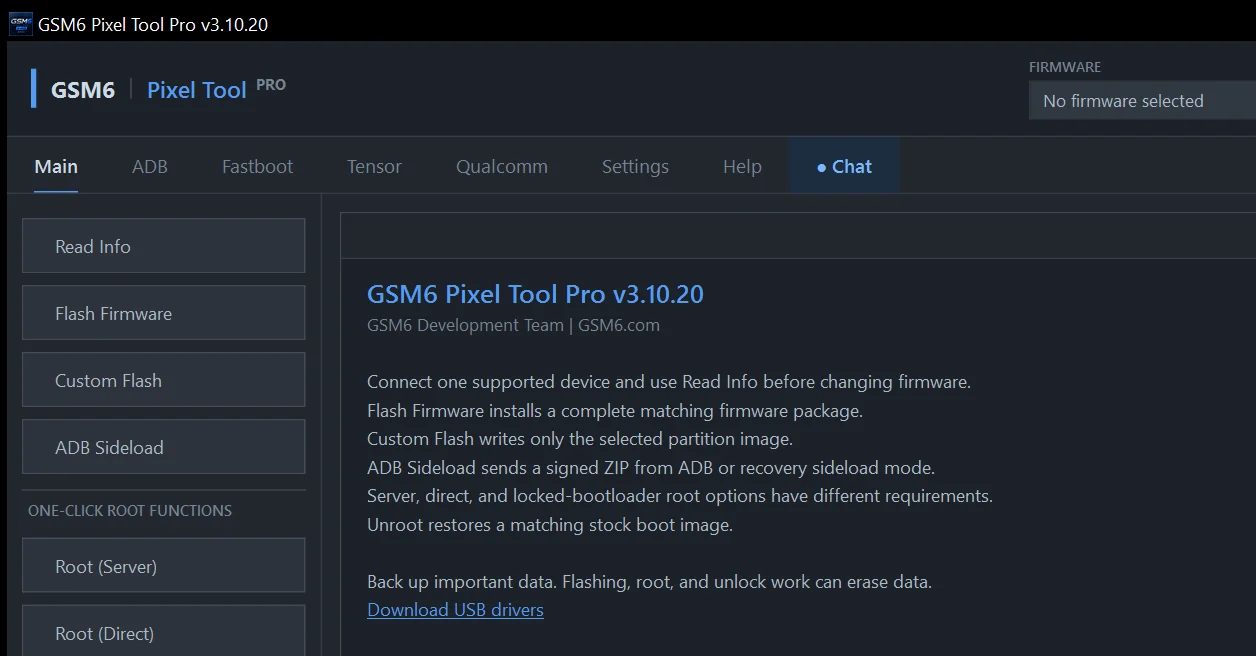
Read Info
Identifies the connected Pixel and reads the available model, codename, build, Android, slot and bootloader state.
- Requires
- One supported device connected through authorized ADB or Fastboot.
- Expected result
- A verified device profile to review before changing firmware.
Main / FLASH & ROOT
Flash Firmware
Installs a complete matching factory firmware package from the selected extracted firmware folder.
- Requires
- Exact factory firmware, Fastboot driver, stable USB and sufficient free disk space.
- Expected result
- A complete stock software installation for the selected Pixel.
ImportantFlashing can unlock the bootloader and erase all user data. Never use another model’s package.
Main / FLASH & ROOT
Secure Flash
Runs a protected full-stock workflow with device, package and security verification across supported slots.
- Requires
- Matching stock firmware, paid access, Fastboot mode, internet and stable USB.
- Expected result
- A synchronized stock installation prepared for safe verification and, where appropriate, later relocking.
ImportantMay unlock the bootloader and erase data. Relock only after the complete stock system boots successfully.
Main / FLASH & ROOT
Custom Flash
Writes one selected partition image rather than installing a complete firmware package.
- Requires
- A compatible image, Fastboot mode and the correct target partition.
- Expected result
- Only the partition selected in the confirmation dialog is written.
ImportantAn incorrect image or partition can stop the phone from booting or damage radio functions.
Main / FLASH & ROOT
ADB Sideload
Uses an existing recovery sideload connection or reboots an authorized ADB device into sideload before sending the selected ZIP.
- Requires
- Compatible signed ZIP, recovery sideload or authorized ADB, and the correct driver.
- Expected result
- The selected update package is transferred to Android recovery.
ImportantRecovery decides whether the package is accepted. Never sideload a package made for another model or build.
Main / FLASH & ROOT
Root (Server)
Uses an available GSM6-hosted root package that matches the exact detected device build.
- Requires
- Supported build, paid access, internet and the requested device mode.
- Expected result
- Matching server root is applied to the connected device.
ImportantRoot can affect device integrity, updates, banking applications, DRM and warranty coverage.
Main / FLASH & ROOT
Root (Direct)
Prepares root from exact matching factory firmware selected by the technician.
- Requires
- Matching official firmware and a supported device state.
- Expected result
- A build-matched root environment is prepared and applied.
ImportantThe operation can erase data. Confirm the complete build before continuing.
Main / FLASH & ROOT
Root (LIVE)
Obtains the current device and firmware profile and prepares a live, exact-build root workflow.
- Requires
- Paid access, internet, supported device state, free disk space and stable USB.
- Expected result
- A root workflow matched to the detected live build for supported Pixel 1–11 devices.
ImportantCan erase all data and may unlock the bootloader. Use Root (Direct) if the required live source is unavailable.
Main / FLASH & ROOT
Root (Locked BL)
A specialist locked-bootloader root workflow for explicitly supported device and build profiles.
- Requires
- A listed model/build, the requested Android state, internet, power and stable USB.
- Expected result
- Supported locked-bootloader root without presenting proprietary implementation details.
ImportantHigh risk: failure or interruption can cause data loss, reboot loops, kernel panic or a non-booting device.
Main / FLASH & ROOT
Unroot (Server)
Restores the matching stock boot image supplied by GSM6 when the exact build resource is available.
- Requires
- Paid access, exact build detection and a supported device mode.
- Expected result
- The matching stock boot image is restored.
ImportantRestoring stock boot alone does not prove that every other partition is stock. Do not relock an uncertain device.
ADB / AUTHORIZED ANDROID
Read Info
Reads the device, Android build, serial, security and connection information available through ADB.
- Requires
- Android running, USB debugging enabled and this computer authorized.
- Expected result
- A current ADB device profile.
ADB / AUTHORIZED ANDROID
Reboot Device
Restarts the connected phone normally into Android.
- Requires
- Authorized ADB connection.
- Expected result
- A normal device restart.
ADB / AUTHORIZED ANDROID
Reboot Bootloader
Restarts Android directly into the bootloader/Fastboot screen.
- Requires
- Authorized ADB connection.
- Expected result
- The device enters Fastboot mode.
ADB / AUTHORIZED ANDROID
Reboot Recovery
Restarts the connected phone into its installed recovery environment.
- Requires
- Authorized ADB connection.
- Expected result
- The device enters recovery mode.
ADB / AUTHORIZED ANDROID
FRP Remove
Runs the supported ADB-side service workflow where the owner has already provided authorized Android/ADB access.
- Requires
- Proof of ownership, authorized ADB and an eligible device state.
- Expected result
- The supported service action is applied where permitted.
ImportantFor lawful owner-authorized repair only. This is not permission to bypass ownership or account protections.
ADB / AUTHORIZED ANDROID
Install APK
Installs a selected compatible Android application package over authorized ADB.
- Requires
- Trusted APK, authorized ADB and a compatible Android version/architecture.
- Expected result
- Android installs the package if its policy and signature checks pass.
ImportantInstall only trusted packages. Existing signatures or device policy can reject the APK.
ADB / AUTHORIZED ANDROID
Backup Partition
Reads and saves a selected partition through the supported root environment.
- Requires
- Authorized ADB, supported root, paid access and enough local storage.
- Expected result
- A local image of the selected partition.
ImportantLabel backups with model, build, slot, serial and date. Protect identity and calibration data.
ADB / AUTHORIZED ANDROID
Restore Partition
Restores a compatible partition backup through the supported root environment.
- Requires
- Authorized ADB, supported root, paid access and an exact compatible backup.
- Expected result
- The selected partition image is restored.
ImportantAn incorrect backup can damage device functions. Never restore another phone’s identity or calibration data.
ADB / AUTHORIZED ANDROID
Lock Bootloader (Secure)
A secure relock workflow for the installed supported build, without requiring a full firmware flash. Includes supported beta builds.
- Requires
- Authorized ADB, paid access, internet and matching resources for the exact model/build.
- Expected result
- Matching stock security resources are restored and the bootloader lock confirmation is requested.
ImportantErases all user data. Existing modifications or mismatched firmware can prevent boot after locking. Support must be confirmed for the exact device/build.
Fastboot / BOOTLOADER CONTROL
Read Info
Reads available bootloader variables, model state, active slot and lock status.
- Requires
- Device in Fastboot mode with a working bootloader driver.
- Expected result
- A current Fastboot device profile.
Fastboot / BOOTLOADER CONTROL
Reboot Normal
Leaves Fastboot and starts Android normally.
- Requires
- Fastboot connection.
- Expected result
- The active slot boots into Android.
Fastboot / BOOTLOADER CONTROL
Reboot Recovery
Starts the supported recovery environment from Fastboot.
- Requires
- Fastboot connection and a bootable recovery path.
- Expected result
- The device enters recovery.
Fastboot / BOOTLOADER CONTROL
Reboot FastbootD
Enters userspace Fastboot for supported dynamic-partition operations.
- Requires
- A compatible device and Fastboot connection.
- Expected result
- The device changes to FastbootD.
Fastboot / BOOTLOADER CONTROL
Power Off
Powers down the phone from Fastboot mode.
- Requires
- Fastboot connection.
- Expected result
- The device turns off.
Fastboot / BOOTLOADER CONTROL
Unlock Bootloader
Starts the official bootloader-unlock flow where the connected Pixel permits it.
- Requires
- OEM Unlocking permitted and user confirmation on the device.
- Expected result
- The bootloader becomes unlocked when accepted.
ImportantUnlocking normally erases every user file and changes the verified security state.
Fastboot / BOOTLOADER CONTROL
Lock/Relock Bootloader
Starts the official bootloader-lock flow after a complete stock restoration.
- Requires
- Complete exact stock firmware that has booted and passed verification.
- Expected result
- The device relocks when the on-device confirmation is accepted.
ImportantRelocking modified, incomplete or mismatched firmware can brick the device and normally erases data.
Fastboot / BOOTLOADER CONTROL
Enter Factory Mode
Moves an eligible supported device into its available factory service state.
- Requires
- A supported model/build and Fastboot connection.
- Expected result
- Factory service mode is entered where supported.
ImportantNot available on every profile. Do not interrupt the transition.
Fastboot / BOOTLOADER CONTROL
Exit Factory Mode
Returns an eligible device from the supported factory service state.
- Requires
- Device currently in the supported factory state.
- Expected result
- Factory mode is exited.
Fastboot / BOOTLOADER CONTROL
Factory Reset / Wipe
Erases user data through the bootloader.
- Requires
- Fastboot connection and explicit confirmation.
- Expected result
- User data is permanently erased.
ImportantPermanent data loss. Confirm the correct connected device before approving.
Fastboot / BOOTLOADER CONTROL
FRP Remove
Runs the supported Fastboot-side service workflow where the required bootloader conditions are met.
- Requires
- Owned or explicitly authorized device and the required bootloader state.
- Expected result
- The eligible supported service action is performed.
ImportantFor lawful repair only. It generally requires an unlocked bootloader and does not establish ownership.
Fastboot / BOOTLOADER CONTROL
Change Active Slot A ⇄ B
Changes which A/B slot the bootloader attempts to start.
- Requires
- Fastboot connection and a known-good target slot.
- Expected result
- The selected slot becomes active.
ImportantThe other slot can be incomplete or incompatible. Switching can make the phone unbootable.
Tensor / PIXEL TENSOR SERVICE
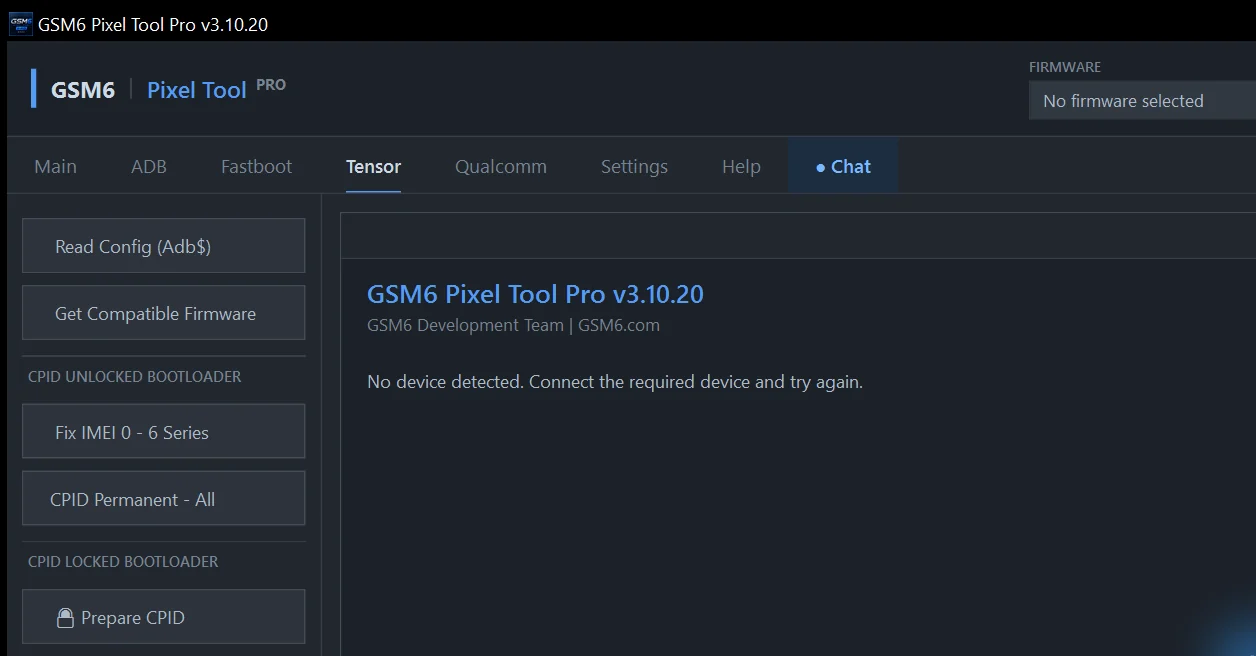
Read Config (Adb$)
Reads supported Tensor configuration and identifier information through the available ADB environment.
- Requires
- Supported Tensor device and requested ADB state.
- Expected result
- A readable device service configuration.
Tensor / PIXEL TENSOR SERVICE
Get Compatible Firmware
Detects the connected model/build and presents compatible firmware records and resources.
- Requires
- A detected supported device and internet connection.
- Expected result
- Firmware information matched to the detected device profile.
ImportantReconfirm the full model and build before downloading or flashing.
Tensor / PIXEL TENSOR SERVICE
Fix IMEI 0 — 6 Series
The supported older Pixel 6-series service workflow for legitimate repair of an invalid or zero identifier.
- Requires
- Eligible Pixel 6-series state and paid access.
- Expected result
- Supported identifier service is applied.
ImportantNot permanent across every update. Restore only the lawful original identity; regional law may restrict this work.
Tensor / PIXEL TENSOR SERVICE
CPID Permanent — All
Runs the supported persistent CPID/IMEI service workflow for eligible rooted Tensor devices.
- Requires
- Supported rooted device, valid original identifier, paid access and stable USB.
- Expected result
- The eligible service value is applied and verified.
ImportantBack up required partitions. Never clone or invent another device’s identity.
Tensor / PIXEL TENSOR SERVICE
Prepare CPID
Prepares an explicitly supported locked-bootloader model/build for the following repair stage.
- Requires
- Listed model/build, paid access and the requested device state.
- Expected result
- The device is prepared for the matching Fix IMEI 0 stage.
ImportantContinue only with owner authorization and the exact supported build.
Tensor / PIXEL TENSOR SERVICE
Fix IMEI 0
Completes the supported repair after preparation and device verification.
- Requires
- Completed preparation, paid access and the lawful original identifier.
- Expected result
- The supported original identifier is restored where eligible.
ImportantNever use an invented, duplicated or unrelated device identity.
Tensor / PIXEL TENSOR SERVICE
Unlock Network
Runs the supported rooted network-service workflow for an eligible Pixel.
- Requires
- Supported root environment, eligible device and paid access.
- Expected result
- The supported server-authorized network service value is applied.
ImportantDoes not cancel debts, contracts, blacklists or legal restrictions. Owner and carrier terms still apply.
Qualcomm / DIAG & EFS
DIAG Port
Lists available diagnostic COM ports and refreshes them after a device or driver change.
- Requires
- Compatible driver and supported device state.
- Expected result
- An available diagnostic port can be selected.
Qualcomm / DIAG & EFS
Enable Diag (root)
Enables the supported diagnostic interface on an authorized rooted device.
- Requires
- Supported root, authorized ADB and correct diagnostic driver.
- Expected result
- The supported DIAG interface becomes available.
Qualcomm / DIAG & EFS
Fix WiFi
Runs the supported Wi-Fi configuration repair for an eligible device.
- Requires
- Supported model/configuration and the requested connection state.
- Expected result
- Eligible Wi-Fi configuration is repaired.
Qualcomm / DIAG & EFS
Reset EFS
Resets the supported EFS/radio configuration area.
- Requires
- A verified original QCN/EFS backup and explicit confirmation.
- Expected result
- The supported EFS area is reset.
ImportantDestructive. Can remove radio calibration, identifiers, network configuration or service. Never continue without a backup.
Qualcomm / DIAG & EFS
Read QCN
Reserved for a future supported QCN backup workflow.
- Requires
- Not yet available as a production function.
- Expected result
- No production action is performed.
Qualcomm / DIAG & EFS
Write QCN
Reserved for a future supported QCN restore workflow.
- Requires
- Not yet available as a production function.
- Expected result
- No production action is performed.
Qualcomm / DIAG & EFS
Fix Corrupted IMEI
Reserved for a future authorized repair workflow.
- Requires
- Not yet available as a production function.
- Expected result
- No production action is performed.